


C++ has no built-in way to draw an SVG icon, so toolkits like GDI, wxWidgets, and your own paint code expect raw pixels. NanoSVG fixes that with two single-header files and no build system to configure: this guide takes a clean SVG exported from Axialis IconVectors and rasterizes it to a Windows HBITMAP for AlphaBlend, to a cross-platform PNG, and to a wxBitmap you can draw in a wxWidgets paint handler.
NanoSVG is the lightest of the common options. If you need full SVG fidelity (filters, gradients-on-strokes, text), see the LunaSVG guide instead; for native toolkit renderers, see WinUI and Qt.
What is NanoSVG, and when to use it
- Two headers, no dependencies —
nanosvg.hparses an SVG into anNSVGimage(a linked list of shapes and paths);nanosvgrast.hrasterizes that image to a straight-alpha RGBA buffer. No build system, no DLLs, public-domain (zlib) license. - Small API surface — the whole flow is four calls:
nsvgParse(),nsvgCreateRasterizer(),nsvgRasterize(), then the matchingnsvgDelete*()cleanup functions. - Know the limits before you commit — NanoSVG covers paths, basic shapes, solid fills, strokes, and linear/radial gradients. It does not handle SVG filters, clip paths, patterns, or text elements. That makes it ideal for single-color UI icons and unsuitable for full illustrations — convert text to paths in IconVectors before exporting.
- Get the headers — clone or download github.com/memononen/nanosvg, then copy
src/nanosvg.handsrc/nanosvgrast.hinto your project (or add the repo as a Git submodule to track upstream fixes). - Define the implementation once — in exactly one
.cpptranslation unit, define the implementation macros before including the headers; every other file includes them without the macros:#define NANOSVG_IMPLEMENTATION #include "nanosvg.h" #define NANOSVGRAST_IMPLEMENTATION #include "nanosvgrast.h"
Export a clean SVG from IconVectors
- Open or create your icon:
- File → Open… (Ctrl+O) or New Icon (Ctrl+N).
- Prefer a simple, single-color shape and a clean
viewBox(e.g.,0 0 24 24).
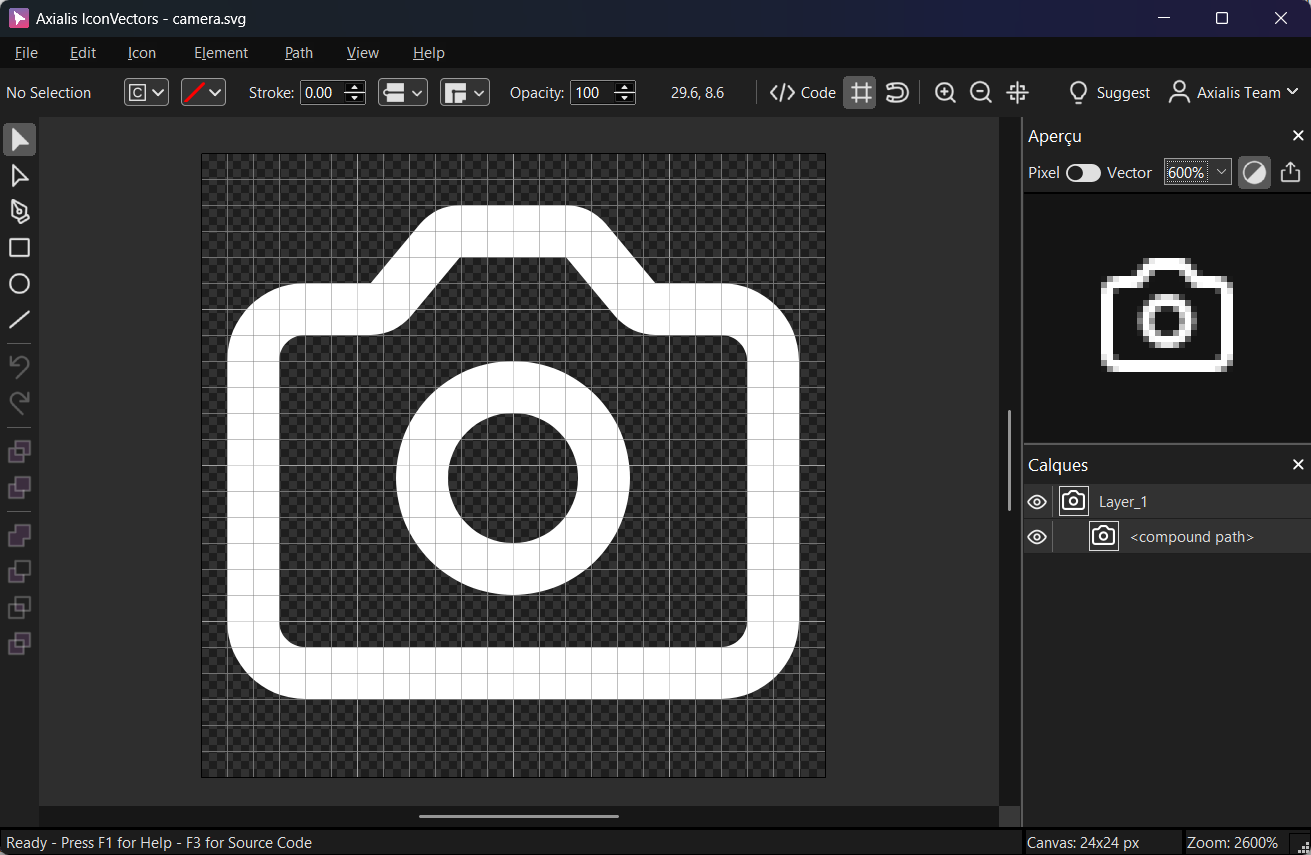
Use File → Export → Export Minified (Shift+Ctrl+M) to get a lean SVG.
Windows: render an SVG to HBITMAP using the Windows API (NanoSVG)
The snippet below parses the SVG from memory, rasterizes it with NanoSVG to straight-alpha RGBA, then converts to a 32-bpp top-down DIB (HBITMAP) with premultiplied BGRA pixels for use with AlphaBlend.
#define NANOSVG_IMPLEMENTATION
#include "nanosvg.h" // SVG parser
#define NANOSVGRAST_IMPLEMENTATION
#include "nanosvgrast.h" // Rasterizer
#include <windows.h>
#include <cstdint>
#include <cstdlib>
#include <cstring>
#include <cmath>
#include <iostream>
static const char kSVG[] = R"SVG(
<svg xmlns="http://www.w3.org/2000/svg" viewBox="0 0 24 24"><path fill="none"
stroke="currentColor" stroke-width="2" stroke-linecap="round" stroke-linejoin="round"
stroke-miterlimit="10" d="M14.8 3.4l1.9 2.3c.2 .2 .5 .4 .8 .4H20c1.1 0 2 .9 2
2v10c0 1.1-.9 2-2 2H4c-1.1 0-2-.9-2-2V8c0-1.1 .9-2 2-2h2.5c.3 0 .6-.1 .8-.4l1.9-2.3
c.2-.2 .5-.4 .8-.4h4.1C14.3 3 14.6 3.1 14.8 3.4zM8.5 12.5c0 1.9 1.6 3.5 3.5 3.5
s3.5-1.6 3.5-3.5s-1.6-3.5-3.5-3.5S8.5 10.6 8.5 12.5z"/></svg>
)SVG";
// Create a top-down 32-bpp DIB HBITMAP from straight RGBA pixels.
// Converts RGBA (straight) → BGRA (premultiplied) for GDI AlphaBlend.
static HBITMAP CreateHBITMAPFromRGBA(const unsigned char* rgba,
int width, int height, int srcStrideBytes)
{
BITMAPINFO bi{};
bi.bmiHeader.biSize = sizeof(BITMAPINFOHEADER);
bi.bmiHeader.biWidth = width;
bi.bmiHeader.biHeight = -height; // top-down
bi.bmiHeader.biPlanes = 1;
bi.bmiHeader.biBitCount = 32;
bi.bmiHeader.biCompression = BI_RGB;
void* dib = nullptr;
HDC hdc = GetDC(nullptr);
HBITMAP hbmp = CreateDIBSection(hdc, &bi, DIB_RGB_COLORS, &dib, nullptr, 0);
ReleaseDC(nullptr, hdc);
if (!hbmp || !dib) return nullptr;
const int dstStride = width * 4;
unsigned char* dst = static_cast(dib);
for (int y = 0; y < height; ++y) {
const unsigned char* s = rgba + y * srcStrideBytes;
unsigned char* d = dst + y * dstStride;
for (int x = 0; x < width; ++x) {
const unsigned char R = s[4*x + 0];
const unsigned char G = s[4*x + 1];
const unsigned char B = s[4*x + 2];
const unsigned char A = s[4*x + 3];
// Premultiply then store as BGRA
const unsigned char Rp = (unsigned)(R * A + 127) / 255;
const unsigned char Gp = (unsigned)(G * A + 127) / 255;
const unsigned char Bp = (unsigned)(B * A + 127) / 255;
d[4*x + 0] = Bp;
d[4*x + 1] = Gp;
d[4*x + 2] = Rp;
d[4*x + 3] = A;
}
}
return hbmp;
}
int main()
{
// 1) Parse SVG (units: px). NanoSVG expects a dpi; 96 is standard for icon work.
NSVGimage* svg = nsvgParse((char*)kSVG, "px", 96.0f);
if (!svg) { std::cerr << "Parse error\n"; return 1; }
// 2) Decide output size (e.g., 24×24 px) and scale from the SVG viewBox size.
const float outW = 24.0f, outH = 24.0f;
const float scaleX = outW / svg->width;
const float scaleY = outH / svg->height;
const float scale = (float)fmin(scaleX, scaleY);
// 3) Rasterize to straight RGBA
NSVGrasterizer* rast = nsvgCreateRasterizer();
if (!rast) { nsvgDelete(svg); return 2; }
const int W = (int)lround(outW);
const int H = (int)lround(outH);
const int stride = W * 4;
unsigned char* rgba = (unsigned char*)std::malloc(H * stride);
if (!rgba) { nsvgDeleteRasterizer(rast); nsvgDelete(svg); return 3; }
nsvgRasterize(rast, svg, 0.0f, 0.0f, scale, rgba, W, H, stride);
// 4) Convert to a premultiplied BGRA top‑down DIB for GDI
HBITMAP hbmp = CreateHBITMAPFromRGBA(rgba, W, H, stride);
// Cleanup NanoSVG buffers
std::free(rgba);
nsvgDeleteRasterizer(rast);
nsvgDelete(svg);
if (!hbmp) { return 4; }
// TODO: Select hbmp into a memory DC and AlphaBlend onto your window DC.
DeleteObject(hbmp);
return 0;
}
Optional: blit with alpha
// After you get HBITMAP hbmp:
HDC hdcScreen = GetDC(hwnd);
HDC hdcMem = CreateCompatibleDC(hdcScreen);
HBITMAP old = (HBITMAP)SelectObject(hdcMem, hbmp);
BLENDFUNCTION bf{};
bf.BlendOp = AC_SRC_OVER;
bf.BlendFlags = 0;
bf.SourceConstantAlpha = 255; // use per-pixel alpha
bf.AlphaFormat = AC_SRC_ALPHA;
AlphaBlend(hdcScreen, dstX, dstY, W, H, hdcMem, 0, 0, W, H, bf);
SelectObject(hdcMem, old);
DeleteDC(hdcMem);
ReleaseDC(hwnd, hdcScreen);
Cross-platform: import SVG and convert to PNG
When you only need a PNG on disk (build-time icon baking, CI, or a headless tool), skip the platform bitmap types entirely: parse and rasterize with NanoSVG, then write the RGBA buffer with a single-header writer such as stb_image_write. The same code compiles on Windows, macOS, and Linux.
#define NANOSVG_IMPLEMENTATION
#include "nanosvg.h"
#define NANOSVGRAST_IMPLEMENTATION
#include "nanosvgrast.h"
#define STB_IMAGE_WRITE_IMPLEMENTATION
#include "stb_image_write.h" // Single-header PNG writer
#include <cstdlib>
#include <cstring>
#include <cmath>
#include <iostream>
static const char kSvg[] = R"SVG(
<svg xmlns="http://www.w3.org/2000/svg" viewBox="0 0 24 24"><path fill="none"
stroke="currentColor" stroke-width="2" stroke-linecap="round" stroke-linejoin="round"
stroke-miterlimit="10" d="M14.8 3.4l1.9 2.3c.2 .2 .5 .4 .8 .4H20c1.1 0 2 .9 2
2v10c0 1.1-.9 2-2 2H4c-1.1 0-2-.9-2-2V8c0-1.1 .9-2 2-2h2.5c.3 0 .6-.1 .8-.4l1.9-2.3
c.2-.2 .5-.4 .8-.4h4.1C14.3 3 14.6 3.1 14.8 3.4zM8.5 12.5c0 1.9 1.6 3.5 3.5 3.5
s3.5-1.6 3.5-3.5s-1.6-3.5-3.5-3.5S8.5 10.6 8.5 12.5z"/></svg>
)SVG";
int main()
{
NSVGimage* svg = nsvgParse((char*)kSvg, "px", 96.0f);
if (!svg) { std::cerr << "Parse error\n"; return 1; }
const int W = 64, H = 64; // desired PNG size
const float sx = W / svg->width;
const float sy = H / svg->height;
const float scale = (float)fmin(sx, sy);
NSVGrasterizer* rast = nsvgCreateRasterizer();
if (!rast) { nsvgDelete(svg); return 2; }
unsigned char* rgba = (unsigned char*)std::malloc(W * H * 4);
if (!rgba) { nsvgDeleteRasterizer(rast); nsvgDelete(svg); return 3; }
nsvgRasterize(rast, svg, 0, 0, scale, rgba, W, H, W*4);
// Write PNG (straight RGBA)
if (!stbi_write_png("output.png", W, H, 4, rgba, W*4)) {
std::cerr << "PNG write error\n";
}
std::free(rgba);
nsvgDeleteRasterizer(rast);
nsvgDelete(svg);
return 0;
}
Cross-platform: NanoSVG + wxWidgets (draw a wxBitmap)
This example converts a NanoSVG raster (straight RGBA) into a wxBitmap and draws it in a wxWidgets paint handler. wxImage stores color and transparency separately, so split the rasterizer output into an RGB buffer and an alpha buffer with SetAlpha() rather than premultiplying.
#define NANOSVG_IMPLEMENTATION
#include "nanosvg.h"
#define NANOSVGRAST_IMPLEMENTATION
#include "nanosvgrast.h"

#include <wx/wx.h>
#include <cstdlib>
#include <cmath>

static const char kSvg[] = R"SVG(
<svg xmlns="http://www.w3.org/2000/svg" viewBox="0 0 24 24"><path fill="none"
stroke="currentColor" stroke-width="2" stroke-linecap="round" stroke-linejoin="round"
stroke-miterlimit="10" d="M14.8 3.4l1.9 2.3c.2 .2 .5 .4 .8 .4H20c1.1 0 2 .9 2
2v10c0 1.1-.9 2-2 2H4c-1.1 0-2-.9-2-2V8c0-1.1 .9-2 2-2h2.5c.3 0 .6-.1 .8-.4l1.9-2.3
c.2-.2 .5-.4 .8-.4h4.1C14.3 3 14.6 3.1 14.8 3.4zM8.5 12.5c0 1.9 1.6 3.5 3.5 3.5
s3.5-1.6 3.5-3.5s-1.6-3.5-3.5-3.5S8.5 10.6 8.5 12.5z"/></svg>
)SVG";

static wxBitmap MakeWxBitmapFromRGBA(const unsigned char* rgba, int w, int h)
{
  // wxImage expects non‑premultiplied RGB + a separate alpha buffer.
  unsigned char* rgb   = new unsigned char[w*h*3];
  unsigned char* alpha = new unsigned char[w*h];

  for (int y = 0; y < h; ++y) {
    const unsigned char* srow = rgba + y * (w*4);
    for (int x = 0; x < w; ++x) {
      const int idx = y*w + x;
      rgb[idx*3 + 0] = srow[x*4 + 0]; // R
      rgb[idx*3 + 1] = srow[x*4 + 1]; // G
      rgb[idx*3 + 2] = srow[x*4 + 2]; // B
      alpha[idx]     = srow[x*4 + 3]; // A
    }
  }
  wxImage img(w, h, rgb, /*static_data=*/false);
  img.SetAlpha(alpha, /*static_data=*/false);
  return wxBitmap(img);
}

class MyApp : public wxApp {
public:
  bool OnInit() override {
    NSVGimage* svg = nsvgParse((char*)kSvg, "px", 96.0f);
    if (!svg) return false;

    const int W=64, H=64;
    const float scale = std::min(W/svg->width, H/svg->height);

    NSVGrasterizer* rast = nsvgCreateRasterizer();
    if (!rast) { nsvgDelete(svg); return false; }

    unsigned char* rgba = (unsigned char*)std::malloc(W*H*4);
    if (!rgba) { nsvgDeleteRasterizer(rast); nsvgDelete(svg); return false; }

    nsvgRasterize(rast, svg, 0, 0, scale, rgba, W, H, W*4);
    wxBitmap wxbmp = MakeWxBitmapFromRGBA(rgba, W, H);

    std::free(rgba);
    nsvgDeleteRasterizer(rast);
    nsvgDelete(svg);

    auto* frame = new wxFrame(nullptr, wxID_ANY, "NanoSVG + wxWidgets", wxDefaultPosition, wxSize(240,160));
    frame->Bind(wxEVT_PAINT, [wxbmp](wxPaintEvent&){
      wxPaintDC dc(wxDynamicCast(wxTheApp->GetTopWindow(), wxFrame));
      dc.DrawBitmap(wxbmp, 40, 40, /*useMask=*/true);
    });
    frame->Show();
    return true;
  }
};
wxIMPLEMENT_APP(MyApp);
Notes & troubleshooting
- Alpha format — the rasterizer returns straight (non-premultiplied) RGBA. GDI's
AlphaBlendwithAC_SRC_ALPHAexpects premultiplied BGRA, so do the conversion shown above; wxWidgets wants separate RGB and alpha buffers, so split the channels instead. Skipping either step produces dark fringes around the icon edges. - Rasterize at the target size — call
nsvgRasterize()at the exact pixel size you will draw (16, 24, 32...) rather than scaling a bitmap afterward. PassoutW / svg->widthas the scale so the icon fills the buffer, and re-rasterize per DPI on high-density displays. - Start from a clean SVG — export from IconVectors with File → Export → Export Minified and a tidy
viewBoxsuch as0 0 24 24. Flatten transforms and convert text to paths first, since NanoSVG ignores both.
Wrapping up
With two headers and four function calls, NanoSVG turns the SVG icons you author in IconVectors into the pixel buffers GDI, stb_image_write, and wxWidgets need. The work that decides image quality happens upstream: a minified, single-color SVG with a clean viewBox and no unsupported elements rasterizes predictably at every size. Author and validate those icons in IconVectors, then drop in the renderer that fits your toolkit.
Related guides
- SVG Icons in C++ with LunaSVG
- SVG Icons in C++ with WinUI & Qt
- SVG Icons in wxWidgets C++
- C++ SVG Icons (use case)
Start Making SVG Icons Today with IconVectors
Download the fully-functional 30‑Day Free Trial and unlock your icon design workflow.
Version 2.00 for Windows (September 3, 2026), macOS (September 15, 2026), and Linux (September 18, 2026).