

IconVectors Features
Axialis IconVectors is a lightweight SVG icon editor built for developers and UI engineers. Where general vector tools like Inkscape or Illustrator target complex illustration, IconVectors focuses on pixel-perfect icons and clean, exportable code, fast.
New in version 2.00: an integrated Icon Explorer with file management and batch processing, a redesigned Colors panel, even-odd fill rules, and MCP support for four more coding agents. Everything from 1.70 is still there: Element Library, Pixel-Align Selection, Auto Gradient, dashed strokes, Analyze/Clean Up Icon, and live code export.
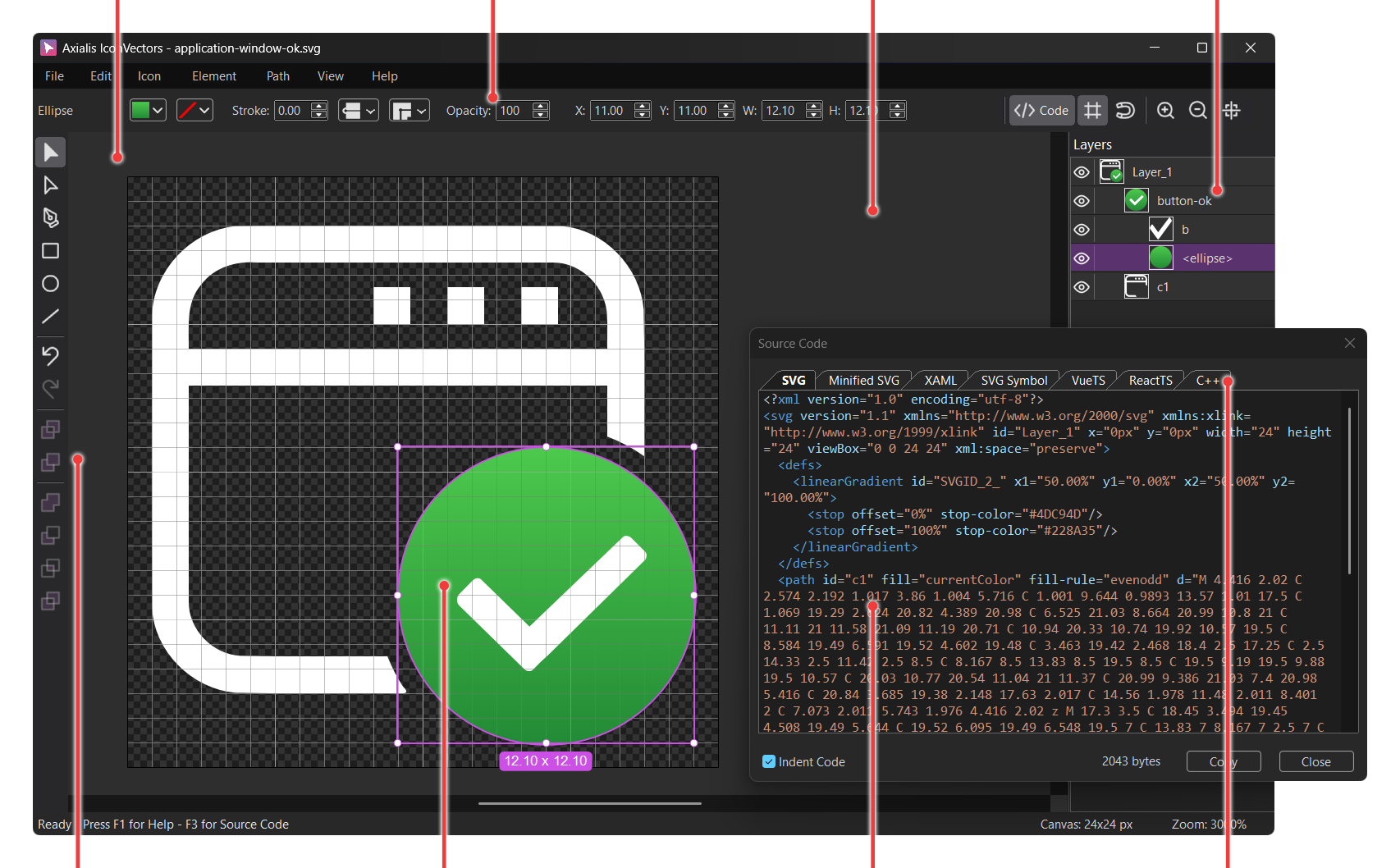
Lightweight
The application is fast and responsive with all‑in‑one window
MCP Automation
Drive the running editor from Codex, Claude, Cursor, VS Code Copilot, Gemini CLI, Kiro, Cline, or GitHub Copilot CLI
Live Code
Generate SVG, SVG Symbol, XAML, WPF Geometry, VectorDrawable, SwiftUI, ReactTS, VueTS, and C++
Layers
Work with complex icon drawings using layers
Vector Tools
Several vector tools are available, including boolean operations
Advanced Editor
Features many tools including path modification, scale, rotation…
Source Code
Real‑time creation of the icon source code
UI Languages
34 interface languages with right‑to‑left support where needed
Why choose Axialis IconVectors?
- Fast and lightweight — Optimized for icons and small-scale SVG assets
- Developer-friendly — Export to SVG, minified SVG, SVG Symbol, XAML, WPF Geometry, VectorDrawable, SwiftUI, ReactTS, VueTS, and C++
- Feature-rich — Includes advanced editing, path control, layer management, and automatic variants
- 2.00 icon workflow — Icon Explorer manages whole folders, batch processing changes many icons at once, and the Colors panel applies fills and strokes with one click
Who is it for?
- Developers — who need icons that integrate directly with code and frameworks
- Designers — who create assets for interfaces or icon packs without unnecessary clutter
- Teams — who value quick iteration, easy export, and style consistency
Icon Explorer, Batch Processing, and the Colors Panel
Icons live in folders, and an editor that only sees one file leaves the renaming, copying, and bulk resizing to other tools. Version 2.00 fixes that with an Icon Explorer workspace, batch processing, a redesigned Colors panel, and SVG fill-rule control. Available now for Windows, macOS, and Linux.

Icon Explorer (F5) shows a folder of SVG files as a thumbnail grid, and stays fast with thousands of files because only the visible tiles are rendered. Pick a tile size from 64 to 256 px, a Light, Dark, Checkerboard, or Borderless background, and filter by filename. Move around with the editable address, Recent Folders, Back and Forward, and one button per drive. The folder is watched, so changes made by other apps show up on their own. Double-click a tile to open it in the Editor; F4 or Ctrl+Tab brings you back. Full reference: Working with the Icon Explorer.
File management is built in: Copy, Paste, Duplicate, Rename, Batch Rename with numbering and zero padding, New Folder, Group in Folder, and a confirmed Delete. Paste and Duplicate never overwrite an existing file. Drag icons between folders (hold Ctrl to copy, Shift to move), to or from Windows File Explorer, or onto the Editor to import them as editable groups. The help lists the exact drag and drop rules.
Batch Processing runs Apply Palette, Resize Icons, or Apply Strokes on every selected file, using the same transformations as the Editor. It plans before it writes: you see exact changed, unchanged, unsupported, and failed counts, and Cancel touches nothing. Output is validated before the originals are replaced, with rollback if anything fails. More operations are on the way. Details: applying batch changes.
Colors panel (View -> Colors) has a PALETTES page for your swatches and a COLORS page with a color field, a hue strip, and HEX, RGB, or HSL values. One rule everywhere: left-click applies to Fill, right-click applies to Stroke. Quick colors (White, Black, currentColor, None) and a Recent row are one click away, and the picked color stays put when you select another element. See Working with Colors.
Fill rules and the Control Bar. Path -> Fill Rule sets Non-Zero or Even-Odd on a compound path, and the choice is saved in the SVG (compound path fill rules). The Control Bar now adapts to the current workspace, document, and selection.
Element Library, SVG Properties, and Pixel-Align Selection
Introduced in 1.70, these are still everyday tools in 2.00. The Element Library inserts ready-made SVG artwork from a local folder; subfolders become tabs, and you can add your own files.
SVG Properties sets the output size, root id, title, description, and preserveAspectRatio without touching the editing canvas. Pixel-Align Selection snaps selected artwork to the pixel grid in one step.
Shortcuts: C cycles line caps, J cycles line joins, X runs Pixel-Align Selection, and holding Ctrl switches between the Selection and Path Editor tools. See the keyboard shortcuts reference.
Analyze/Clean Up Icon
Run Icon -> Analyze, Clean Up Icon... (Shift+Alt+A) to find the usual production problems: off-grid geometry, inconsistent strokes, hidden leftovers, empty groups, transforms, unused definitions, and off-palette colors.
The issue list stays open while you keep editing. Apply Low-Risk Fixes handles the safe ones; Fix All... confirms the rest. AI clients get the same analysis through the document_analyzeCleanupSvg MCP command.
See the Analyze and Clean Up SVG Icons Before Export tutorial, or the AI-generated SVG cleanup page if the icon came from an AI tool.
Auto Gradient and Dashed SVG Strokes
Auto Gradient turns a flat fill or stroke into a same-tone linear or radial gradient in one step, tunable by type, angle, and strength. Dashed and dotted strokes come as Control Bar presets or a custom dash dialog, saved as standard SVG dash attributes.
Fit Icon to Canvas scales the icon to the full canvas, centered, without changing stroke widths. Zoom by typing a percentage, picking a preset, or dragging an area with the Zoom tool.
AI Automation with MCP
IconVectors runs a local Model Context Protocol server with 155 tools and Claude-safe names such as app_ping and document_getSvg. An AI client works on the live document: it inspects the DOM and selection, creates shapes, edits paths, runs cleanup, applies palettes and gradients, renders previews, and exports code. In 2.00 it can also drive the Icon Explorer and the batch tools. Your client launches the IconVectorsMcp sidecar, which talks to the running app over 127.0.0.1:61337; an iconvectors-mcp skill ships with the application.
Eight clients are documented: Codex CLI, Claude Desktop and Claude Code, Cursor, VS Code with GitHub Copilot, Gemini CLI, Kiro, Cline, and GitHub Copilot CLI. The MCP integration reference covers the shared model.
- Create and edit icons from prompts — Natural language drives the real document, not a detached SVG snippet.
- Inspect before changing — Query the document, layers, selection, styles, and paths before anything is modified.
- Export through the same editor — SVG, Minified SVG, SVG Symbol, XAML, WPF Geometry, VectorDrawable, SwiftUI, ReactTS, VueTS, C++, and bitmaps from one drawing.
- Use host-specific tutorials — Codex CLI, Claude, VS Code Copilot, Cursor, Gemini CLI, Kiro, Cline, GitHub Copilot CLI, and driving the Icon Explorer and batches from MCP.
Designed for Icon Edition
General vector tools can do icon work, but they make it slow and skill-heavy. IconVectors offers simple functions made for icons.
For example, badge overlays: add a badge and IconVectors cuts out the space under it so it stays readable:
Available for Windows, macOS & Linux
IconVectors runs natively on Windows (32-bit and 64-bit), macOS, and Linux x64. Version 2.00 is out for Windows, macOS, and Linux. The trial is fully functional for 30 days:
Live Code Viewer (SVG, Minified SVG, SVG Symbol, XAML, WPF Geometry, VectorDrawable, SwiftUI, ReactTS, VueTS, C++)
See production code update as you draw. Switch tabs to SVG, minified SVG, SVG Symbol, XAML, WPF Geometry, VectorDrawable, SwiftUI, React TypeScript, Vue TypeScript, or C++, then copy with one click.
The viewer preserves a consistent viewBox (e.g., 0 0 24 24) and supports currentColor theming.
Explore Use Cases:
Icon System Helpers
Build consistent, theme‑ready icon sets faster with tools made for design systems.
- One‑click theme variants — Generate Hot/Hover, Disabled, and Dark Theme versions automatically to keep your UI states aligned.
- State overlays — Add badges (e.g., error, sync, new) with optional cutout and subtle shadow for readability.
- Palette workflows — Collect all icon colors, deduplicate, sort by hue, and reuse swatches across a full icon set.
- Grid presets — Start on precise icon grids (16/20/24/32/48 px) with pixel‑aligned strokes and a locked
viewBoxfor predictable sizing.
All Core Features
- SVG Vector Icon Editing – Open, create, and save icons in the industry-standard SVG format, optimized for small-sized assets with faster performance and simplified editing.
- User-Friendly Editor – A streamlined interface with customizable zoom, grid/snapping, and precision positioning for clear, accurate design.
- Icon Explorer - Browse a folder of SVG files as a virtualized thumbnail grid with live folder updates, filename filtering, per-drive navigation, and built-in copy, paste, duplicate, rename, batch rename, delete, and drag and drop; open any tile in the Editor with a double-click.
- Batch Processing - Run Apply Palette, Resize Icons, or Apply Strokes on many SVG files at once with a validated preflight plan, exact change counts, staged output, and rollback on failure.
- Fill Rules - Set Non-Zero or Even-Odd on a selected compound path from Path -> Fill Rule; the fill-rule attribute is read on SVG import and written on export.
- Layer Management – Visually organize icons with renaming, reordering, grouping, locking, and visibility toggles for clean structure.
- Preview Window — Inspect icons in smooth or pixel mode at multiple scales with light or dark backgrounds, plus drag & drop SVG export.
- Trace Bitmap — Import bitmap images auto‑traced into black & white SVG paths; also works when pasting bitmaps.
- Selection Tool – Move, scale, rotate, duplicate, or skew elements with keyboard precision and instant duplication via Alt+drag.
- Path Editing Tool – Edit vector paths at anchor level: add/remove nodes, adjust handles, open/close shapes, and reshape with Bezier logic.
- Pen Tool – Draw open or closed paths point by point; close paths by clicking the first point or press Esc to finish.
- Text Tool – Convert typed text into editable vector paths (one glyph per character) using installed fonts.
- Geometric Shape Tools – Quickly draw and edit rectangles, ellipses, lines, and polygons, or convert them to paths for advanced tweaks.
- Boolean Operations – Combine, subtract, intersect, or exclude shapes for complex vector forms with one click.
- Advanced Color Editing – Assign stroke/fill, use recent palettes, or open a dialog for HSV, RGB, CMYK, and HEX input.
- Colors Panel – One pane, two pages: PALETTES manages swatches and palettes (add, rename, sort, collect all icon colors in one click) and COLORS picks a color by HEX, RGB, or HSL; left-click applies it to Fill, right-click to Stroke, and a Recent row keeps the colors you applied.
- Gradient Editing – Apply and edit linear/radial gradients with visual color stops, angle settings, and real-time preview.
- Control Bar – Fine-tune stroke width, color, opacity, position, alignment, rotation, and layering in one place.
- Live Code Viewer – View source code in SVG, minified SVG, SVG Symbol, XAML, WPF Geometry, VectorDrawable, SwiftUI, VueTS, ReactTS, and C++; copy instantly to your project.
- Recolor with Palette – Recolor the full icon using only colors from the selected palette, mapping each icon color to the nearest palette swatch.
- Focus Mode + Auto-center Canvas – Toggle a distraction-free editing layout and keep the canvas centered automatically when resizing the window or changing view context.
- GPU Acceleration – Improved rendering performance provides smoother pan/zoom and faster interaction on complex icons.
- Icon Resizing Options – Resize canvas or canvas+artwork, maintain aspect ratio, and align visuals before export.
- Color Adjustments – Adjust Brightness, Contrast, Hue, Saturation, Levels, plus Desaturate, Invert, and preview filters.
- Color Variant Generator – One-click variants for Hot, Disabled, and Dark Theme states for consistent UI libraries.
- Badge Overlay Tools – Add badges with cutout masks or shadows to indicate states like sync, error, or new.
- Undo/Redo System – Multi-level undo/redo with visual feedback for error recovery and experimentation.
- Transformation Support – Automatic application of transforms to geometry for export compatibility.
- Dark and Light UI Themes – OS-level detection or manual switch for working in any environment.
- International UI – 34 interface languages with right‑to‑left support where needed.
- Multiple Windows – Open several icons in separate windows, copy layers between docs for workflow boost.
- Shell SVG Thumbnail Extension – Enable Windows Explorer previews of SVG thumbnails for visual asset management.
- Sample Icons Included – Free SVG icons to learn from or build on, right out of the box.
- Auto-Save & Crash Recovery – Background auto-save and recovery prompt after crashes or power loss.
- Fast and Lightweight – Launches in seconds, minimal resources, built in native C++ with no bloat.
- One-Year Free Updates – 12 months of free updates included; renew only when you want new features.
Ready to put these features to work? Buy an IconVectors license for perpetual use with one year of free updates.
Start Making SVG Icons Today with IconVectors
Download the fully-functional 30‑Day Free Trial and unlock your icon design workflow.
Version 2.00 for Windows (September 3, 2026), macOS (September 15, 2026), and Linux (September 18, 2026).