

I changed the color of one folder icon in an SVG sprite. After a browser reload, two buttons turned orange. The SVG diff showed that the editor had also rewritten the folder's path.
One symbol, two buttons
In a small vanilla Vite demo, the Files and Project files buttons both point to the same symbol in public/icons.svg:
<svg aria-hidden="true">
  <use href="./icons.svg#icon-folder"></use>
</svg>
I opened the sprite in IconVectors 2.30 for Windows, changed the folder fill from #25385c to #C2410C, and saved. Both folders turned orange after reloading the page. Search and Done stayed pixel-identical in the before and after captures, and all three symbol IDs still resolved. I build IconVectors at Axialis.
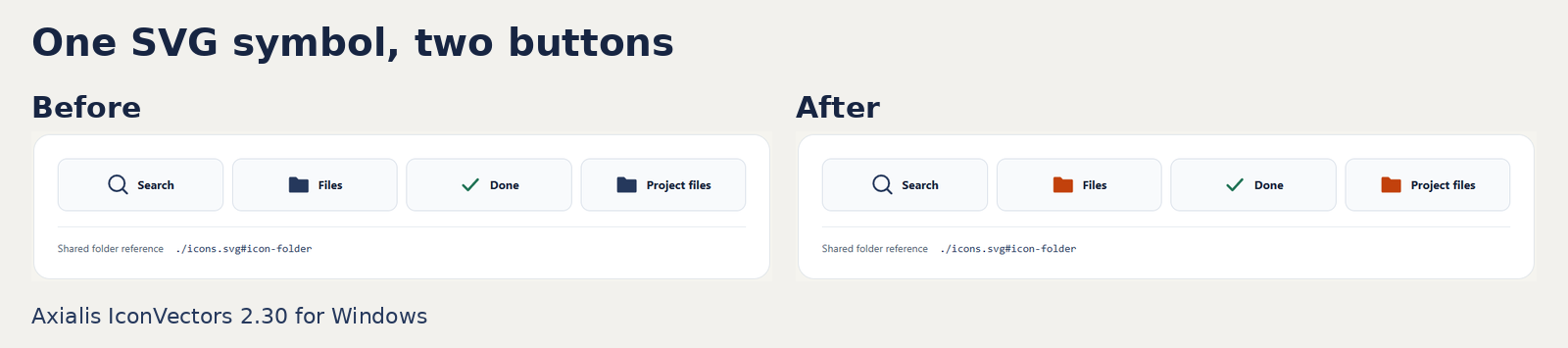
What the diff showed
I kept a copy of the sprite before editing so I could compare the two files directly:
git diff --no-index verification/icons.before.svg public/icons.svg
The folder symbol kept its id="icon-folder" and viewBox="0 0 24 24". The fill changed as expected. The save also added an xmlns:xlink declaration to that symbol, changed its formatting, and converted the rounded-corner arc commands in d to cubic Bézier curves. The markup for icon-search and icon-check stayed intact.
What I'd check before merging
- References. Check that every existing
<use>still points to a symbol that exists. - Rendered output. Reload a page that uses the edited symbol more than once. Verify each occurrence, then check a nearby icon you didn't edit.
- Source diff. Review changes to the path,
viewBox, and attributes before committing.
Try the Before / After toggle on CodePen or download the runnable Vite demo with both SVGs, the screenshots, and the full diff.