

AI Icon Cleanup
Clean up AI-generated SVG icons
AI can draft icons quickly, but generated SVGs often need cleanup before they belong in a real interface. IconVectors helps you inspect paths, reuse Element Library artwork, fix geometry, run Pixel-Align Selection, apply production styling such as Auto Gradient and dashed strokes, fit artwork to the canvas, and standardize exported SVG assets.
Works with any AI-generated SVG
Clean SVG structure
Turn rough output into maintainable markup.
Pixel-grid control
Fix alignment, spacing, and small-size clarity.
Consistent icon sets
Standardize one icon or a full generated set.
Fix the issues AI leaves behind
Normalize strokes, clean spacing, and remove structure noise before the icon reaches your product.
Common cleanup targets
Off-grid geometry, uneven spacing, broken alignment, inconsistent stroke weight, flat styling, and loose canvas bounds.
Shipping result
A refined SVG that behaves like a real interface icon, not a rough generated draft.
Problem
AI icons look good... until you try to use them
AI-generated icons often look impressive at first glance. But once you start using them in a real app, the problems become obvious.
This is the part AI doesn't solve.
- Inconsistent stroke widths
- Broken alignment
- Uneven sizes and spacing
- Messy SVG structure
- Visual inconsistencies across icon sets
Solution
Turn AI output into production-ready icons
IconVectors helps you clean, refine, and standardize AI-generated icons so they work the way real interface icons should.
Whether you generate one icon or a full set, IconVectors gives you the control needed to make the result clean, consistent, and usable in production.
- Clean and optimize SVG structure
- Align icons to the pixel grid
- Normalize sizes and spacing
- Ensure a consistent visual style
- Refine details with precision
- Export clean, production-ready SVG
Before / After
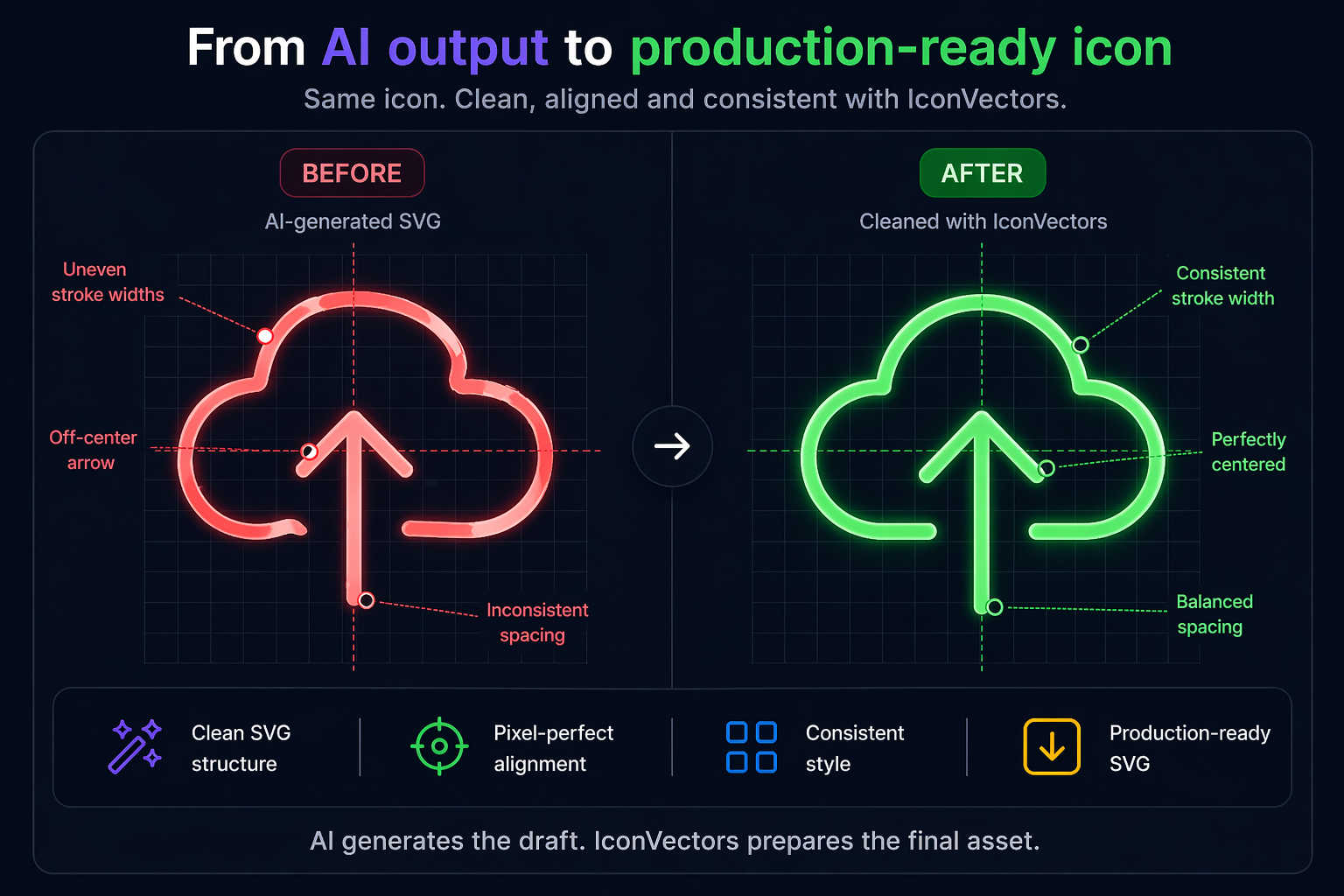
Workflow
Your AI-to-UI workflow
AI is great for speed and exploration. IconVectors is what comes next.
-
1
Generate icons with AI
Create a fast first draft with your preferred AI workflow.
-
2
Import them into IconVectors
Open the generated SVG and inspect the structure, geometry, and alignment.
-
3
Clean and standardize the result
Normalize strokes, spacing, visual rhythm, gradient styling, and canvas bounds so the icon behaves like part of a real set.
-
4
Export production-ready SVG
Ship a refined asset with clean markup and predictable rendering.
-
5
Use the icon in your UI
Drop the cleaned result into your app, website, or product interface with confidence.

IconVectors is the missing step between AI output and real interface design.
Who It's For
Built for developers using AI
If you use AI to generate icons and need them to look right in a real product, IconVectors is for you.
- Indie hackers shipping fast
- SaaS builders creating product UI
- Frontend developers working with SVG
- Designers refining AI-generated assets
- Teams building consistent icon sets
Differentiation
AI vs IconVectors
| AI | IconVectors |
|---|---|
| Generates icons | Makes them usable |
| Fast creative output | Precise visual control |
| Inconsistent results | Standardized icons |
| Raw SVG | Clean, production-ready SVG |
| Good for exploration | Built for refinement and shipping |
Related Guides
Keep refining the SVG workflow
Use these guides when the AI draft needs real cleanup, MCP automation, smaller delivery files, or web-app integration.
Analyze and clean up SVG icons
Inspect off-grid geometry, inconsistent strokes, hidden leftovers, and transform issues before export.
Generate clean SVG icons with AI and MCP
Create an icon through the live editor, then retouch paths and export clean assets.
Minify and optimize SVG icons
Reduce delivery size while preserving viewBox, theming, and maintainable output.
Use cleaned SVG icons in web apps
Choose inline SVG, sprites, accessibility labels, and currentColor theming for production UI.
Fix your AI icons now
Import your AI-generated icons, clean them up, and turn them into polished assets you can actually use in production.
Download IconVectors →No design skills required