Working with Colors
Open the shared Colors pane with . The pane has two compact pages:
PALETTES contains the existing palette selector, palette commands, and reusable swatches. See Working with Color Palettes.
COLORS is a fast picker for defining and applying solid fill and stroke colors.
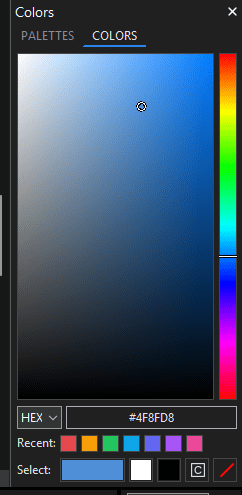
The COLORS page with the screen eyedropper beside the value editors.
The defined color
The COLORS page owns one independent defined color. The Saturation/Value field, Hue strip, value editors, and large swatch on the Select: row all represent that same color.
The defined color does not follow the selected drawing element. Selecting another element, switching documents, changing a color elsewhere, or using Undo and Redo does not replace it.
Choosing a color
Use the large two-dimensional field to choose saturation from left to right and value (brightness) from top to bottom. Use the vertical strip to choose Hue.
Left-click to choose a color and apply it to Fill; right-click to apply it to Stroke.
Hold either button and drag to adjust the color. The picker previews your choice while you drag; the selected artwork changes once, when you release the button. You do not need to double-click.
Press Esc during a drag to cancel it and restore the starting color. Losing the drag capture also cancels without applying a color.
When the Hue strip has keyboard focus, Up decreases Hue by one degree and Down increases it by one degree. Hue wraps at the ends.
Choose HEX, RGB, or HSL in the value-mode list to edit the same defined color in a different notation. Changing modes does not change the color. Entering a value selects the existing text when the field first receives focus, so you can type a replacement immediately. The picker uses solid sRGB colors and does not edit alpha.
Keyboard adjustments and value entry prepare the defined color without applying it. Use the large Select: area when you are ready to apply a value entered this way. Applying a field or Hue choice does not add it to Recent:.
Picking a color from the screen
Click the eyedropper button to the right of the HEX, RGB or HSL editors. Move over the desktop, including another application, and use the magnified preview and hexadecimal value to find a pixel. Left-click to apply its color to Fill, or right-click to apply it to Stroke. The accepted color also becomes the pane’s defined color and appears in Select:, but does not reorder Recent:.
The borderless eyedropper button has a neutral background and highlights blue when you point at it or press it. Keyboard focus uses a dotted outline while keeping the background neutral. In the enlarged preview square, the outlined cell marks the exact screen pixel being sampled. The preview stays inside the current monitor when the pointer approaches an edge.
The screen is captured when sampling starts, before the sampler’s own preview appears. This is the displayed, composited RGB color at that moment, not the original color or transparency of the other application’s source image. Moving the pointer previews only; it does not recolor the document. Press Esc to cancel without changing the defined color, artwork, drawing defaults or Recent list. A changed editing target or lost sampling session is not applied to a different selection. The confirmation click is consumed by the sampler, not passed to the application underneath it.
Screen sampling uses temporary local memory. It does not save screenshots, change the clipboard, or upload screen contents. Protected content and capture restrictions are not bypassed; HDR or color-managed source-value matching is not guaranteed.
Note
Desktop sampling is initially available on Windows. macOS and Linux need their own verified capture and permission support; an unavailable sampler explains this instead of returning a black or stale color. Direct field/Hue application and the existing value editors do not depend on desktop capture.
Applying colors
The color controls use a consistent mouse-button convention:
Left-click applies a color to Fill.
Right-click applies a color to Stroke.
For selected artwork, a completed picker gesture or accepted screen sample is one undoable color change. With no elements selected, the existing drawing defaults are changed instead; this does not recolor every element in the icon.
On the Select: row:
The large colored area applies the defined color. It is the only control that adds a missing color to Recent: or promotes an existing one.
White and Black apply those quick colors without changing the defined color or Recent list.
[C] applies the SVG
currentColorpaint value without changing the defined color or Recent list.None applies no paint to Fill or Stroke without changing the defined color or Recent list.
Each Recent swatch applies its displayed solid color. Clicking one does not load it into the defined color and does not reorder the Recent list.
The Control Bar Fill and Stroke menus remain available. See Working with Elements for those controls and other color choices.