Optimizing SVG files
Optimizing SVG files
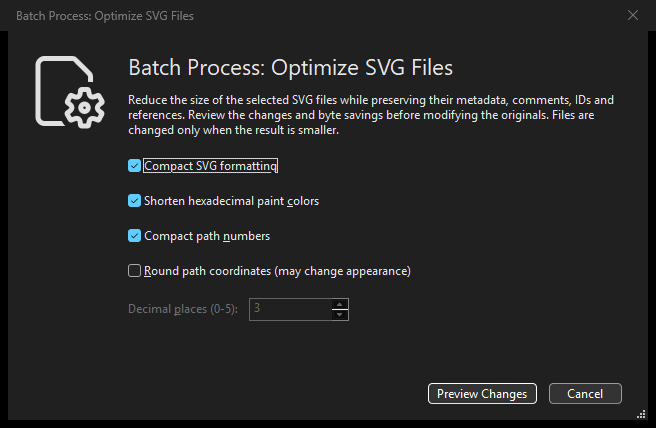
Optimizing SVG files: Dark Theme options dialog.
Select saved SVGs and choose . The default options compact markup formatting, shorten supported hexadecimal paint colors and compact equivalent path-number spelling. They retain IDs, references, definitions, metadata, license comments, titles/descriptions, significant text and canvas dimensions. Already compact files keep their exact bytes and timestamps when the candidate would not be smaller.
Choose which independent optimizations to use:
Compact SVG formatting: remove unnecessary markup spacing without discarding meaningful text, comments or metadata.
Shorten hexadecimal paint colors: use shorter equivalent hexadecimal spellings where supported; this does not remap colors to a palette.
Compact path numbers: shorten equivalent numeric spellings in path data without rounding coordinates.
Round path coordinates: an optional, appearance-changing precision limit, controlled by Decimal places as described below.
Round path coordinates is off by default. Enable it only after reviewing the appearance warning, then choose 0 to 5 decimal places (initially 3). It rounds path coordinates and radii; arc flags and rotation angles retain their values. Values outside path data are unchanged. This can alter artwork. At least one transformation must be enabled.
Choose Preview Changes to open Confirm Optimize SVG Files. Review the Ready To Batch Process: Optimize SVG Files heading, selected/hidden counts, enabled options, per-file states, before/after thumbnails and planned byte savings. Both previews use the same fixed rendering color. Click Optimize SVG Files to modify the reviewed sources. Actual savings count only committed changed files; failed or rolled-back work is not successful savings.
Back up or commit important source files first: these changes have no Editor
Undo. Cancel leaves the source files unchanged, and stale inputs require a new
plan. Unsupported or unsafe SVG syntax is reported per file without a partial rewrite. This
command does not remove metadata or definitions, rename IDs, flatten transforms
or sanitize SVGs. The Editor’s Export Minified SVG command keeps its existing
behavior. MCP provides explorer_batch_optimize_svg_files with the same
plan/apply workflow; see Optimizing selected SVG files.